Cellar Team Workflow (Mobile PWA) & AI Assistants (Jobs Copilot & Cellar Data Chatbot) (`L8` & `MOBILE`)
Coordinate daily work between the winemaker's office and cellar operators on the tank floor using the Mobile PWA, execute Today's tasks (/taches), turn voice dictation or handwritten cellar sheets…
🎯 Winemaking Goal
Coordinate daily work between the winemaker's office and cellar operators on the tank floor using the Mobile PWA, execute Today's tasks (/taches), turn voice dictation or handwritten cellar sheets into structured job cards via the AI Jobs Copilot (with mandatory human validation — HITL), and query live cellar data in natural language with the AI Question Chatbot.
✅ Prerequisites
- AI features are enabled for the cellar.
- On iOS or Android, install
https://app.oenologic.appto the Home Screen as a PWA for full-screen (430×932) offline-capable operation.
🛠️ Step-by-Step Instructions
Step 1 — Manage Today's jobs on Desktop & Mobile (/ & /taches)
- On the
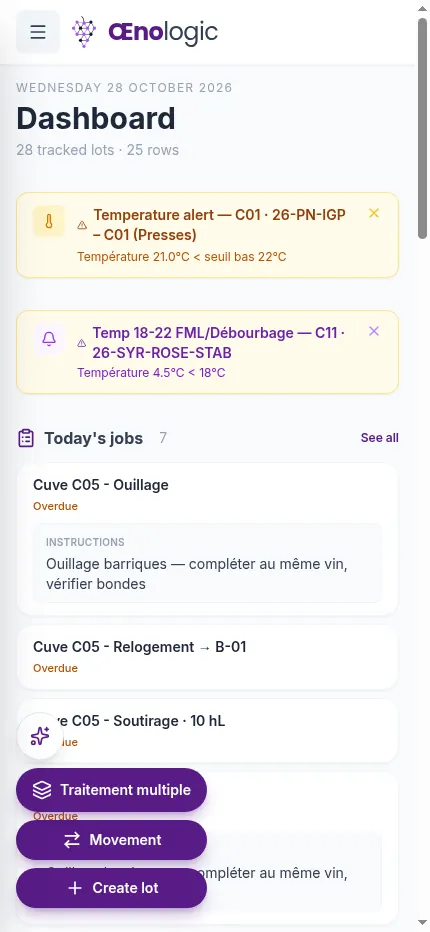
Dashboard(/), theToday's jobssection displays all scheduled tasks (7 tasks: Tank C05 — Topping up, Tank C05 — Transfer → B-01, Tank C05 — Racking 10 hL, Tank C06 — Topping up, Tanks C07 & C08 — Sulfiting). - Open
Today's tasks(/taches) on Desktop or Mobile to filter betweenTo do,Upcoming, andHistory, prepare inputs (Prepare), and mark work complete (Complete / Confirm).



Step 2 — Use the AI Jobs copilot (Voice Dictation & Photo Scan with HITL Review)
- Tap the floating AI sparkle button (✨) at the bottom left to open the 4 assistants:
Jobs,Reading,Tasting, andQuestion. - Select
Jobsto openJobs copilot:- Dictate instructions by voice (powered by Voxtral + your cellar's custom phonetic dictionary) or snap a photo of a handwritten cellar work order.
- Click
Analyze: the AI generates Human-In-The-Loop (Review before confirming) preview cards (e.g., Card 1: Tank C06 Sulfiting 3 g/hL Potassium metabisulfite; Card 2: Tank B17 Topping up).
- Edit any field if needed, then click
Schedule (2)(to assign to operators in/taches) orComplete now (2)(to log immediately).

Step 3 — Query Live Cellar Data with the AI Question — cellar data Chatbot
- From the floating AI menu (✨), click
Questionto openQuestion — cellar data. - Ask any question in natural language (e.g., "List all my Syrah lots currently in the cellar with their volume, status, and latest free SO₂ and malic acid analyses").
- The read-only assistant queries your live cellar data and returns a verified markdown summary table.